
No tests found
Try changing the difficulty filter or check back later.
Online Hindi Typing Test: The Ultimate Guide to Speed and Accuracy
In today's digital India, proficiency in regional languages is more than just a cultural asset—it is a critical professional skill. Specifically, the ability to type fluently in Hindi has become a gateway to thousands of government jobs and administrative roles. Whether you are preparing for the SSC, Railways, or State Public Service Commission exams, mastering the Online Hindi Typing Test is essential for success.
This comprehensive guide will walk you through everything you need to know about Hindi typing, from choosing the right font (Mangal vs. Kruti Dev) to using the best practice tools available online.
Why Hindi Typing is Essential Today
With the push for digitalization in Indian government sectors, the demand for skilled Hindi typists has skyrocketed. Most clerical and data entry positions now require a certification or a practical test to prove your speed and accuracy.
Taking a Hindi typing test is not just about typing fast; it is about accuracy and familiarity with specific keyboard layouts. Many candidates fail not because they don't know Hindi, but because they are unfamiliar with Hindi typing online tools or the specific font required for their exam.
Getting Started: Keyboards and Layouts
To begin your journey, you need the right setup. If you are a complete beginner, diving straight into a test might be overwhelming.
- For Beginners: We recommend starting with our step-by-step Hindi Typing Tutor to learn proper finger placement on the home row.
- For Dual Proficiency: If you are also preparing for central jobs that require both languages, practice daily on our English Typing Tutor to maintain speed in both scripts.
The Role of the Hindi Typing Keyboard
A Hindi typing keyboard is essentially a virtual map that assigns Hindi characters to your English keys. For example, in the Kruti Dev layout, the 'D' key might type 'क' (ka), whereas in Inscript, the mapping is different.
If you are practicing offline, you may need a hindi typing keyboard download for your PC. However, for most users, practicing via a browser-based India typing test Hindi platform is more convenient as it requires no installation and simulates the actual exam environment.
Using a Hindi Typing Chart
For beginners, memorizing the key mapping is the hardest part. This is where a Hindi typing chart becomes your best friend. A chart visually displays which English key corresponds to which Hindi character.
- Kruti Dev Hindi typing chart: Focuses on the Remington layout.
- Inscript chart: Focuses on the standard government-approved layout.
Print out a chart and keep it near your screen while you practice. It reduces the frustration of "hunting and pecking" for keys.
Understanding the Fonts: Mangal vs. Kruti Dev
One of the biggest areas of confusion for beginners is the difference between fonts. Unlike English typing, which uses a standard QWERTY layout, Hindi typing relies heavily on the specific font family used.
1. Mangal Font (Unicode)
The Hindi typing Mangal font is increasingly becoming the standard for government exams, including the SSC (Staff Selection Commission). It uses the Unicode encoding system, which means the text appears consistent across different computers and browsers. If you are preparing for central government jobs, prioritizing the Hindi typing test Mangal font is crucial. This often utilizes the Remington Gail or Inscript layout.
2. Kruti Dev (Legacy)
Kruti Dev hindi typing is based on the Remington typewriter layout. It is a non-Unicode font and is widely used in state-level exams (like in Rajasthan, UP, and Bihar) and older stenography tests. If your target exam specifies this font, you must practice specifically for the Hindi typing test Kruti Dev.
Language Tools for Content Creators
Sometimes, you don't need to take a test; you simply need to convert text for a document, email, or social media post.
- Quick Conversion: Use our English to Hindi Converter to instantly turn Roman English (Hinglish) into proper Hindi text.
- Reverse Translation: Our Hindi to English tool gives you accurate meanings instantly.
- Regional Support: Tools for English to Marathi and Marathi to English conversion.
How to Practice Effectively
Consistency is key. Here is a structured approach to your Hindi typing practice:
- Start with Finger Placement: Just like English touch typing, Hindi typing requires proper finger placement. Do not look at the keyboard! Use on-screen guides provided by hindi typing practice online websites to train your muscle memory.
- Move to Words and Sentences: Once you know the characters, start typing simple words. Many platforms offer easy Hindi typing exercises designed for beginners.
- Use Dictation Tools: A fantastic way to improve speed is through Hindi typing dictation. Listen to audio clips of Hindi passages and type them out in real-time. This mimics the environment of stenography tests.
Utilizing Online Hindi Typing Tests
Once you have the basics down, it is time to test yourself. An Online Hindi Typing Test provides immediate feedback on two critical metrics:
- WPM (Words Per Minute): Your gross and net speed.
- Accuracy Percentage: How many errors you made.
Most government exams require a speed of 25 to 35 WPM with at least 90-95% accuracy. Using an India typing test Hindi simulator helps you get used to the pressure of a timer.
Hindi Typing Charts: Your Visual Guide
A Hindi typing chart is an essential reference tool for anyone learning to type in Hindi. These charts show the mapping between English keyboard keys and Hindi characters, helping beginners memorize key positions faster.
KrutiDev (Remington) Keyboard Chart
The KrutiDev Hindi typing chart is based on the traditional Remington typewriter layout. It is widely used in state government exams across Rajasthan, Uttar Pradesh, Bihar, and Madhya Pradesh.
KrutiDev Remington Layout Features
- Non-Unicode font – Works only in software that supports Kruti Dev
- Shift key combinations – Many characters require Shift + key
- Alt codes – Special conjunct characters use Alt + numeric codes
- Logical grouping – Similar sounds are grouped together (क ख ग घ)
KrutiDev (Remington) Keyboard Layout
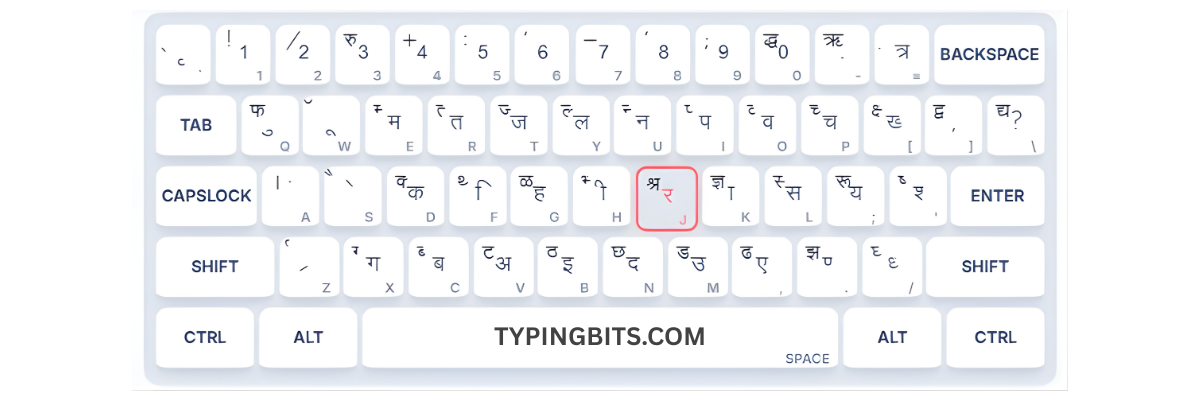
Pro Tip: Print this chart and keep it near your keyboard while practicing!
Download KrutiDev PDF ChartMangal (Inscript) Keyboard Chart
The Mangal Inscript chart follows the official Inscript layout standardized by the Government of India. It is the required layout for SSC, IBPS, Railways, and most central government typing examinations.
Mangal Inscript Layout Features
- Unicode compliant – Works across all modern systems and browsers
- Phonetic arrangement – Vowels on left side, consonants on right
- Built into Windows – No additional software needed
- Scientific layout – Based on Devanagari script structure
Mangal (Inscript) Keyboard Layout
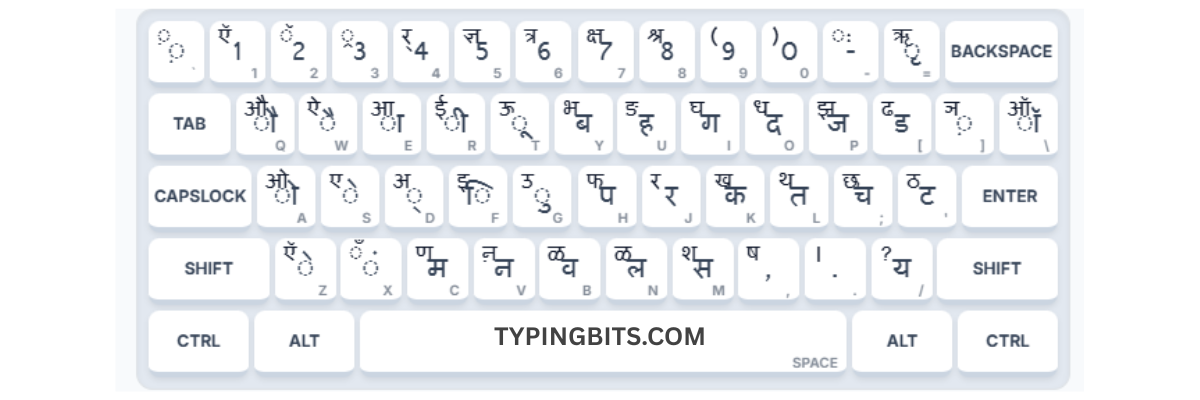
Official Layout: This is the Government of India approved Inscript layout.
Download Mangal PDF ChartImportant KrutiDev Alt Codes
Alt codes are essential for typing special conjunct characters (संयुक्त अक्षर) in KrutiDev font. These combinations are commonly found in Hindi words and mastering them is crucial for achieving high typing speed.
Conjunct Characters (संयुक्त अक्षर)
| Character | Alt Code | Example Word |
|---|---|---|
| क्र | Alt + 0216 | क्रमांक |
| ट्र | Alt + 0170 | राष्ट्र |
| क्त | Alt + 0228 | शक्ति |
| द्द | Alt + 0200 | उद्देश्य |
| द्व | Alt + 0196 | द्वारा |
| ट्ट | Alt + 0205 | मिट्टी |
| ठ्ठ | Alt + 0206 | चिट्ठी |
| ड्ड | Alt + 0207 | कबड्डी |
| ड्ढ | Alt + 0212 | बुड्ढा |
| ह्र | Alt + 0226 | ह्रदय |
Special Characters & Symbols
| Character | Alt Code | Usage |
|---|---|---|
| ँ | Alt + 0161 | चाँद (Chandrabindu) |
| – | Alt + 0150 | Dash (–) |
| ' | Alt + 0146 | Inverted Comma |
| द्य | Alt + 0204 | विद्या |
| त्त | Alt + 0217 | कुत्ता |
| न्न | Alt + 0233 | अन्न |
| स्त्र | Alt + 0243 | वस्त्र |
| झ् | Alt + 0220 | ब्रझा |
| भ् | Alt + 0180 | अभ्यास |
| फ़ | Alt + 0182 | रफ़्तार |
Pro Tip: Alt Code Usage
To use Alt codes, hold the Alt key, type the number on your Numeric Keypad (not the top row numbers), then release Alt. Make sure Num Lock is ON!
How to Calculate Hindi Typing Speed?
Understanding how Hindi typing speed is calculated is crucial for exam preparation. Different exams use different formulas, and knowing them helps you track your progress accurately.
G Gross Speed (WPM)
This measures your raw typing speed without considering errors. Every 5 keystrokes = 1 word.
N Net Speed (WPM)
This is your actual speed after error deductions. Most exams use Net WPM for evaluation.
Example Calculation
📝 Total Characters Typed: 1500
⏱️ Time Taken: 10 minutes
❌ Errors Made: 10
📊 Gross WPM: (1500 ÷ 5) ÷ 10 = 30 WPM
📊 Net WPM: 30 – (10 × 0.5) = 25 WPM
Government Exam Speed Requirements
25 WPM
Lower Division Clerk (LDC)
30 WPM
Upper Division Clerk (UDC)
35 WPM
Stenographer
Correct Typing Posture & Ergonomics
Proper typing posture is not just about comfort—it directly impacts your typing speed, accuracy, and long-term health. Following ergonomic guidelines prevents repetitive strain injuries and helps you type efficiently for extended periods.
Body Posture
- 1Sit straight with your back supported by the chair
- 2Keep your feet flat on the floor or footrest
- 3Maintain 90° angle at elbows and knees
- 4Keep shoulders relaxed, not hunched
Screen & Equipment
- 1Position monitor at arm's length distance
- 2Top of screen should be at eye level
- 3Keyboard at elbow height with slight tilt
- 4Wrists should float above keyboard, not rest on desk
Correct Finger Placement (Home Row)
For touch typing, your fingers should always return to the home row after pressing any key:
The F and J keys have raised bumps to help you find the home row without looking.
20-20-20 Rule
Every 20 minutes, look at something 20 feet away for 20 seconds. This prevents eye strain during long typing sessions.
Make Learning Fun: Typing Games
Typing games are an excellent way to improve your speed and accuracy while having fun. Gamification makes practice sessions more engaging and helps build muscle memory faster than traditional drills.
Keyboard Jump
Jump and dodge obstacles by typing the correct keys. Test your reflexes!
Play NowType Blaster
Blast away enemies by typing words quickly. Fast-paced action typing!
Play NowSheriff Type
Be the fastest typist in the Wild West! Draw and type to win duels.
Play NowType Defense
Defend your base by typing words to destroy incoming enemies!
Play NowFrequently Asked Questions (FAQ)
Q: Which font is best for SSC typing exams?
A: Most modern SSC exams require the Hindi typing Mangal font (Inscript or Remington Gail layout). However, always check your specific exam notification.
Q: How can I increase my Hindi typing speed?
A: The secret is "Touch Typing." Stop looking at the keyboard and use a Hindi typing chart only for reference. Consistent practice on our Hindi Typing Tutor for 30 minutes daily can double your speed in a month.
Q: Can I use English keyboard for Hindi typing?
A: Yes! You do not need a physical Hindi keyboard. You simply need to change your system input settings or use an Online Hindi Typing Test tool that maps your English keys to Hindi characters automatically.
Q: What is the difference between Kruti Dev and Mangal?
A: Kruti Dev is a legacy font that acts like a typewriter (non-Unicode). Mangal is a Unicode font used in modern computing and the internet. They use different key mappings, so practicing on the correct one is vital.
Conclusion
Passing a government typing exam requires dedication, the right tools, and a strategic approach. By utilizing an Online Hindi Typing Test regularly, understanding the difference between Hindi typing Mangal font and Kruti Dev, and keeping a Hindi typing chart handy, you can master this skill in a matter of weeks.
Don't wait until the exam date is announced. Start your Hindi typing practice online today, track your progress, and secure that government job you have been dreaming of.