
Hindi Typing Chart Guide (2025): Master KrutiDev & Mangal Layouts
A picture is worth a thousand words, especially when learning to type. Download high-resolution Hindi keyboard charts, understand finger placement, and speed up your learning curve by 300%.
In this Mega Guide:
1. Why Do You Need a Hindi Typing Chart?
Imagine trying to navigate a new city without a map. You might eventually find your way, but you will get lost dozens of times. Learning Hindi typing without a Visual Chart is exactly like that.
Unlike English keyboards where 'A' prints 'A', Hindi keyboards map complex characters to English keys. For example, pressing 'D' might type 'क' in one layout and '्' (Halant) in another. A printed chart acts as your GPS. It builds Muscle Memory by allowing your brain to visually associate a key location with a Hindi character without looking down at your hands.
🧠 The Psychology of Visual Learning
When you stick a typing chart on the wall behind your monitor, you use "Peripheral Vision." You don't look down at the keyboard (which is a bad habit); instead, you look slightly up at the chart. This reinforces Touch Typing habits, which is essential for high-speed typing exams.
# KrutiDev (Remington) Chart
The KrutiDev layout is based on the old mechanical typewriter system (Remington Gail). It is technically a "Legacy" font layout but remains the standard for many state-level exams like:
- UP Police Computer Operator
- Rajasthan High Court LDC
- Bihar Beltron Data Entry Operator
- MP CPCT (Remington Option)

To learn this layout effectively, check our specialized KrutiDev Typing Tutor.
# Mangal (Inscript) Chart
Inscript (Indian Script) is the government standard. It is a "Scientific" layout because it follows a logical pattern based on phonetics. It is used in:
- SSC CGL / CHSL / MTS
- Railways (NTPC)
- CRPF / CISF / Delhi Police
- Banking Exams (IBPS)
💡 The "Half-and-Half" Rule
The Inscript chart is divided perfectly down the middle.
Left Hand: Types all Vowels (Swar) and Matras (e.g., अ, आ, ि, ी).
Right Hand: Types all Consonants (Vyanjan) (e.g., क, ख, ग, घ).
This makes it much faster to learn than KrutiDev because you alternate hands constantly.
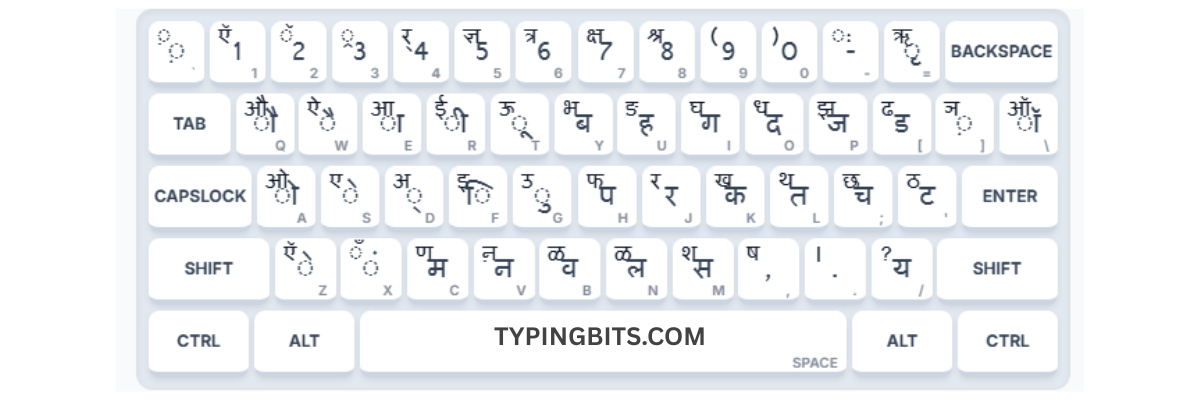
If you are preparing for central government exams, don't waste time on KrutiDev. Start directly with our Mangal Typing Tutor.
📥 Download Free High-Quality Charts
We have prepared print-ready PDFs including the keyboard layout map and the essential Alt Code lists you need.
4. Proper Finger Placement
Having the chart is useless if your fingers are on the wrong keys.
The Home Row (Middle Row)
Your fingers must always rest here. The keys F and J have small bumps on them. Use these to find your position without looking.
| Hand | Finger | Key (English) | KrutiDev Char | Mangal Char |
|---|---|---|---|---|
| Left | Little | A | ं (Anusvar) | ो (O Matra) |
| Left | Ring | S | े (E Matra) | े (E Matra) |
| Right | Index | J | र | र |
| Right | Middle | K | ा (Aa Matra) | क |
6. Your 30-Day Mastery Plan
Days 1-5: The Home Row
Do not touch any other row. Just practice ASDF and JKL;. Print the chart and look at IT, not your hands.
Days 6-10: Upper & Lower Rows
Start reaching up for QWER... and down for ZXCV... Return to home row after every key press.
Days 11-20: Shift Key & Half Letters
This is the hardest part. Use the "Pinky Finger" for shift. If typing a letter with the Right hand, hold Left Shift, and vice versa.
Days 21-30: Alt Codes & Speed
Memorize the top 10 Alt Codes (like 'kr', 'tra', 'ddha'). Take daily Speed Tests.
Frequently Asked Questions
Q: Should I learn KrutiDev or Mangal?
It depends 100% on your exam. For SSC/Railways, learn Mangal (Inscript). For State Clerical exams (UP/Raj/Bihar), learn KrutiDev. Check your exam notification carefully.
Q: Can I use Google Input Tools (Transliteration)?
No! Transliteration (typing "namaste" to get "नमस्ते") is strictly prohibited in typing exams. You must use the actual keyboard layout mapped in our charts.
Q: How do I type half letters in Mangal?
It's very easy in Mangal. Just type the full letter and press the 'Halant' key (D). For example, to type 'क', type k (क) + d (्). In KrutiDev, you often need Shift keys or Alt codes.
Ready to Type at 40 WPM?
You have the charts, you have the strategy. The only thing left is practice.